Selling on Mobius, Rebuilt: Three New Pages and Three Ways to Sell


For most of our platform's life, selling on Mobius happened on one page. It showed every listing, every auction result, and every sale at once. That worked for a seller with a handful of parts. It did not hold up at hundreds.
Sellers found what they needed, and the answers were all in there. Getting to them just took more steps than it should have. Checking which parts were live, seeing what an auction earned, or confirming the price set on a listing each meant moving across a few screens or pulling an export.
We have launched a redesign built on one principle: at every moment, tell the seller what they have and what to do right now.
Three pages, three jobs
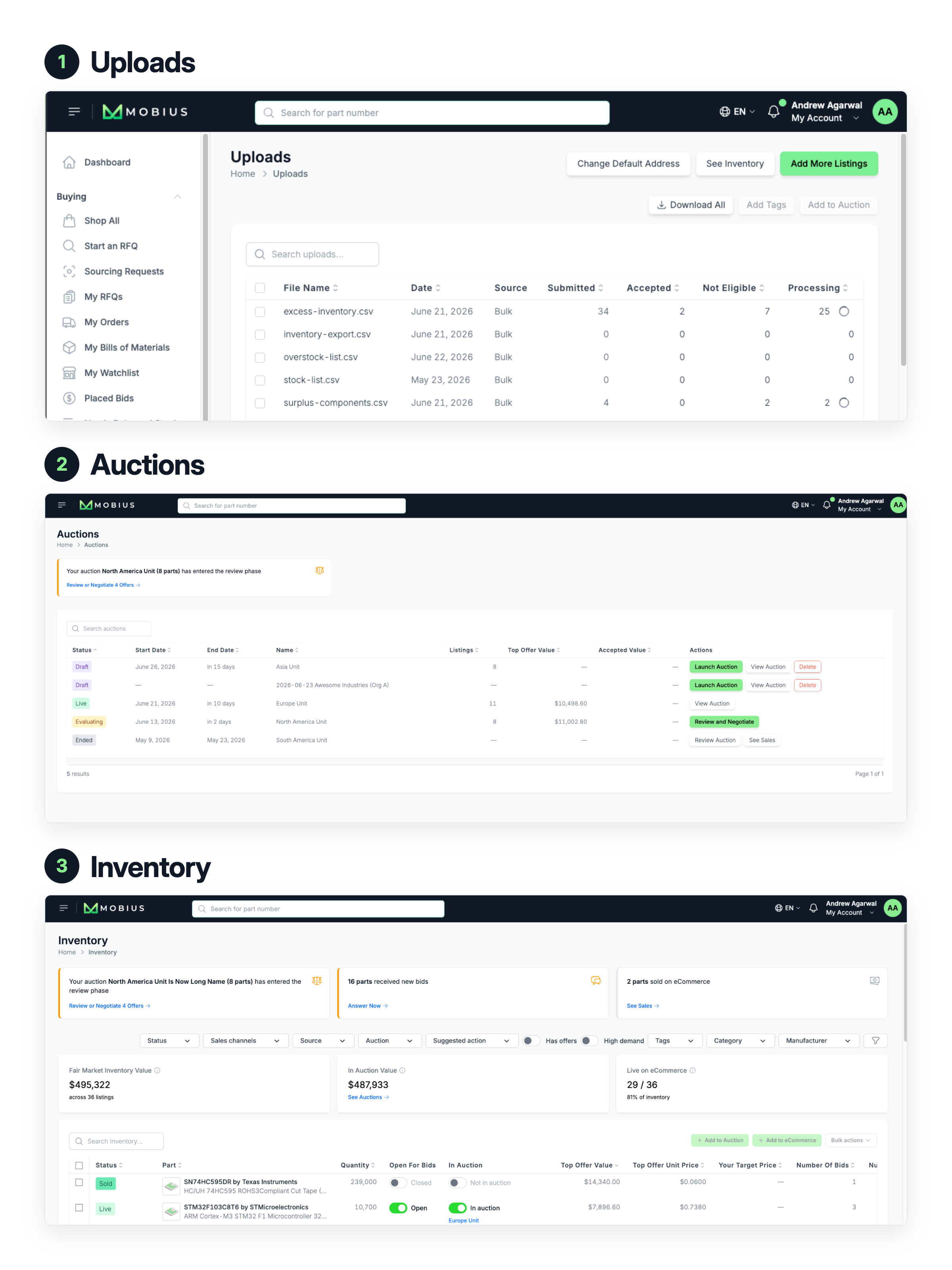
Uploads shows what you submitted and what went live. Every line from your file, the part number you provided, the one we matched, quantity, date code, and status. When something does not make it onto the platform, the page gives the reason.
Auctions gives each auction its own page. Results, timeline, and bid status sit together instead of pooled with every auction you have run. Listings can be added by tag, picked individually, or pulled in as a whole upload batch.
Inventory is where you decide how each part sells. Add parts to an auction or pull them back out, open them to bids, or set a price for direct purchase, in bulk or one listing at a time. Action items surface what needs attention, whether that is new bids, an auction entering review, or a recent sale.
Three ways to sell
Every listing carries its own distribution settings, and sellers choose them one listing at a time.
Open for Bids. Parts are publicized on the Mobius store and sent to distribution lists such as NetComponents. Buyers propose, and every offer comes back to you to review and approve. This fits sellers working to a firm target price.
In Auction. Parts join a time-boxed Mobius auction where buyers compete with live bids. When it closes, you review and accept the winning offers against a reserve you set. Auction listings are open for bids as well, which widens the pool of buyers seeing them. This fits sellers converting inventory to cash quickly.
On eCommerce. Parts show as Mobius preferred stock on our store and go out to other eCommerce sites such as Octopart. Buyers order directly at the eCommerce price. This fits sellers holding out for a specific number.
A listing can sit on more than one channel, and the choice can differ from one part to the next.

What this means for buyers and sellers
Distribution channels do more than give sellers options. They tell a buyer exactly what they are looking at. A part on eCommerce is available now at the price shown. A part in an auction has a close date. A part open for bids is open to a proposal. Sellers keep their inventory current and stand behind the prices they set, so stock listed on Mobius is stock a buyer can actually get.
Uploads, Auctions, Inventory, and distribution channels are live
Log in to see the new pages and choose a distribution channel for the parts you already have listed.
If you have not sold on Mobius before, our team can walk you through which channel fits your inventory.